How many dedicated circuits and network drops does a serious home golf simulator bay really need?
Power and data are the two systems buyers plan last and regret first. Here is how to size circuits, place outlets and run wired networking before the drywall closes.
Start by counting what actually draws power in the room
Most buyers assume a simulator is a low-draw hobby room, and on paper the golf equipment alone supports that view. A projector, a desktop computer, a launch monitor, a small display for the control station and a network switch together typically sit in the same range as a modest home office. The trouble is that the golf gear is rarely the largest load in the room. The heater that makes a garage bay usable in February, the mini split that makes an attic bay usable in July, the dehumidifier that protects a basement, and the lighting rig that keeps the hitting area evenly bright are all appliances in their own right, and they run at the same time as everything else. Related: How much space does a premium home golf simulator bay actually require?
Build the list before you talk to anyone. Write down every device that will be plugged in, whether it runs continuously or only during a session, and whether it starts with an inrush surge, which compressors and motors do. That single page turns a vague request into a specification a licensed electrician can price. It also exposes the quiet additions people forget: a small refrigerator by the seating, a subwoofer, a charger shelf for rangefinders and phones, and the ceiling fan that ends up being the only thing moving air behind the screen. Actual load calculations and code requirements vary by jurisdiction, so treat your list as input to a professional, not as a substitute for one.
Keep reading: How much space does a premium home golf simulator bay actually require?, Which launch monitor technology gives the most accurate readings for home use?, What separates a five thousand dollar bay from a fifteen thousand one?. See how Golfbayr helps you the complete guide to premium home golf simulators.
Why one dedicated circuit is rarely the right answer
The common advice is to add a dedicated circuit for the simulator, which is half of a good plan. The better structure is to separate the room into two electrical worlds. Climate and comfort equipment, meaning heaters, mini splits, dehumidifiers and anything with a motor, belongs on its own circuit because it cycles hard and can pull the line voltage down when it starts. Sensitive electronics, meaning the computer, the projector, the launch monitor and the audio gear, belong together on a separate circuit so that a compressor kicking on does not show up as a flicker in the projected image or a dropout in a sensor reading. Related: Which launch monitor technology gives the most accurate readings for home use?
Keeping the audio and video devices on the same circuit has a second benefit that is easy to miss until you hear it. When a projector and a computer and an amplifier sit on different circuits fed from different sides of the panel, small voltage differences between their grounds can travel down the video and audio cables and appear as hum in the speakers or faint banding on the screen. Sharing one circuit for the connected gear removes the most common cause. In a garage, also ask whether the existing receptacles share a circuit with the door opener and the freezer, because that arrangement is common and it puts your projector on the same line as the noisiest devices in the house.
Outlet placement matters more than outlet count
A bay with plenty of receptacles in the wrong places still ends up with extension cords crossing the hitting area, which is both a trip hazard and a slow way to damage a cable with a mishit. Think in four zones. The ceiling needs a recessed box within reach of the projector mount so no cord dangles into the light path. The screen wall needs power for a fan or a dehumidifier, placed off to the side and well clear of ball flight. The hitting zone itself should have nothing at floor level in front of the golfer. The control side, where the computer, the monitor and the seating live, needs the largest cluster, ideally more receptacles than you think you need. Related: Should you choose a ceiling mounted or floor standing simulator setup?
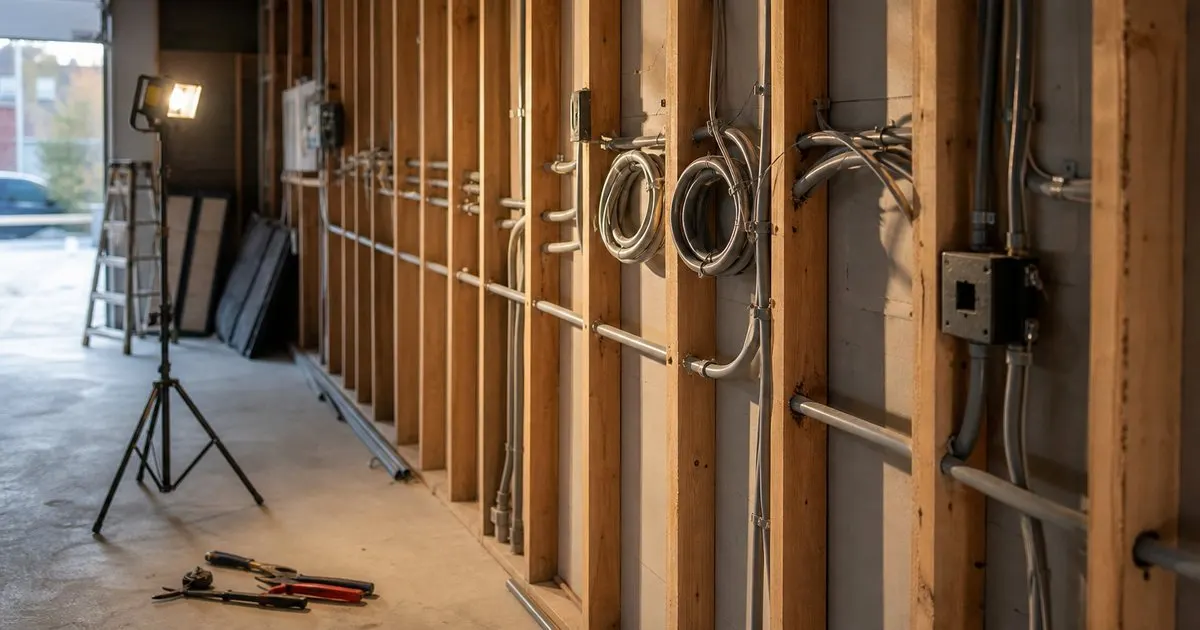
Protection deserves the same thought. A surge protective device at the panel, plus a good quality surge strip at the equipment, guards against the spikes that shorten projector lamp and laser life. A small uninterruptible supply for the computer and the launch monitor is worth more than its modest cost, because the failure that actually hurts is not a dramatic outage but a brief brownout in the middle of a software update, which can leave a course library or a firmware image half written. If the room is being framed or refinished anyway, run conduit or in-wall rated cable now. Adding a ceiling box after the ceiling is closed and painted costs several times what it costs while the studs are open.
Wired networking is the upgrade nobody puts on the wish list
Simulator software is delivered and maintained like modern gaming software, which means large downloads for course libraries, regular patches and occasional full reinstalls. Doing that over a marginal wireless link in a basement or a detached garage, both of which are among the worst radio environments in a house, is how a Saturday session becomes a Saturday of troubleshooting. Plan at least one wired drop to the control station for the computer, and strongly consider a second drop where a ceiling mounted wireless access point can serve the room properly. If the launch monitor communicates over its own local wireless network, a dedicated access point also keeps that traffic from fighting with the household network for airtime. Related: How do professional installers soundproof a home golf bay for daily play?
The physical run costs almost nothing while walls are open and a great deal afterwards. Use cable rated for in-wall installation, keep the data run from lying parallel against a power run for long stretches, and terminate at a proper wall plate rather than leaving a bare cable coiled behind the desk. Put a small switch at the control station so the computer, an access point and any future device share one drop. None of this is glamorous, and no part of it appears in a product photograph, but the difference between a bay that updates quietly overnight and one that stalls partway through a download is almost always the network rather than the golf equipment.
- List every device in the room, including heaters and dehumidifiers, before asking an electrician for anything.
- Split the room into two circuits: motors and climate on one, sensitive electronics together on another.
- Place a recessed ceiling box at the projector, cluster receptacles on the control side, keep the hitting zone clear.
- Run at least one wired network drop while walls are open, and add surge protection plus a small backup supply.

Julien Jimenez
Julien Jimenez is an independent software builder based in Paris. He designs, ships, and operates focused SaaS products for small businesses and independent professionals. Read the full author page.
Your Game, Ready Every Morning
The complete guide to premium home golf simulators. Golfbayr is built to help you put this into practice.
Build your bayMore from the Golfbayr blog

How much space does a premium home golf simulator bay actually require?
Which launch monitor technology gives the most accurate readings for home use?
What separates a five thousand dollar bay from a fifteen thousand one?
Get the complete home golf simulators guide
Our full buying guide, the price guide, and new research as we publish it. One email, no spam, unsubscribe any time.